> ## Documentation Index
> Fetch the complete documentation index at: https://daily-docs-source-analytics-user-turn-strategies.mintlify.site/llms.txt
> Use this file to discover all available pages before exploring further.
# Evals Lifecycle
> How local Pipecat Evals fit with platform testing, monitoring, and team-scale evaluation.
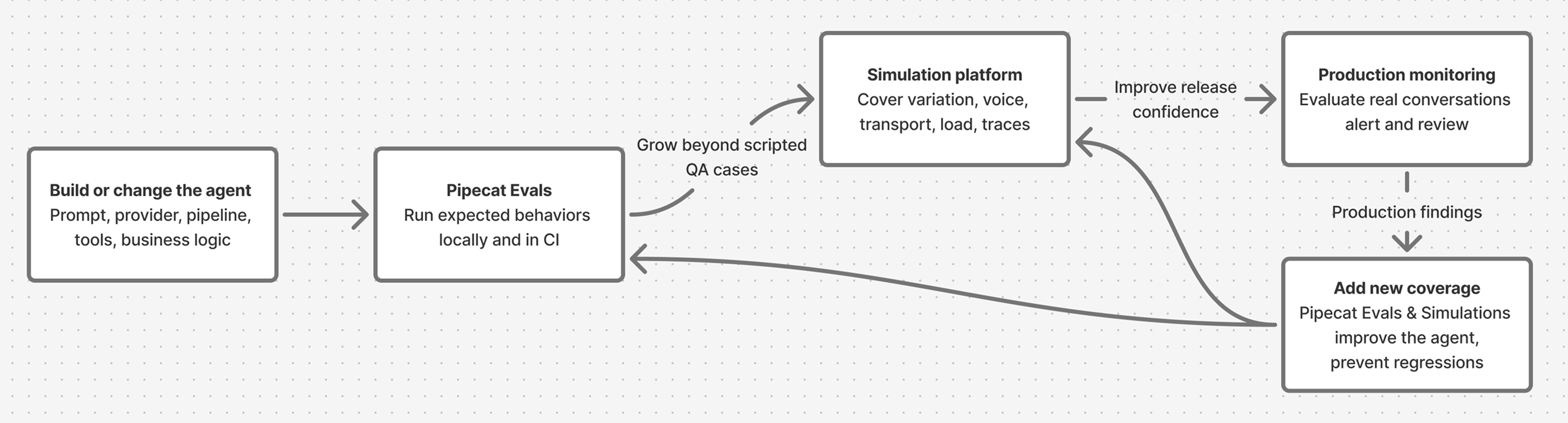
Pipecat Evals gives you a durable first layer for agent quality: fast, local,
repeatable checks for the behavior your agent should preserve as code, prompts,
models, and tools change. As the agent moves toward production, the evaluation
surface expands: local scenarios stay active, and realistic simulations,
audio-signal metrics, trace-backed checks, submitted production calls, and
review workflows give product, QA, and operations teams shared quality signals.
Strong evaluation programs keep both layers active:
* **Pipecat Evals** for executable specifications close to the codebase.
* **An [evaluation platform](/pipecat/evals/overview#production-evaluation)**
for production-like conversations, richer voice analysis, dashboards,
monitoring, human review, and longitudinal quality trends.
## Lifecycle at a glance
 ## Start local
Use Pipecat Evals as soon as the agent has behavior worth preserving.
This usually starts before deployment, while the agent still runs on a laptop or
in a pull request.
Good local evals look like small executable specs:
* "The agent greets on connect."
* "The agent remembers the user's name two turns later."
* "The agent calls `lookup_order` before answering an order-status question."
* "The agent recovers when the user interrupts a long answer."
* "The first response starts within the expected latency budget."
This is where Pipecat Evals is strongest. Text mode keeps the loop fast and
cheap while you iterate on prompts, logic, and function calling. Audio mode adds
an end-to-end check for VAD, STT, TTS, turn-taking, and speech transcription
before you merge or release.
The [Eval Suites](/pipecat/evals/suites) page describes Pipecat's own release
evals as a manifest with 100+ example agents. The same pass/fail result is also
useful for coding assistants because it gives them a concrete command to run and
a clear failure artifact to fix against.
## Put local evals in CI
Once a few scenarios exist, run them on every meaningful change. A small set of
behavior-critical scenarios gives engineers and coding assistants a clear
pass/fail signal.
Use Pipecat Evals in CI when:
* The agent is still changing quickly.
* The question is "did this code or prompt change preserve an expected behavior?"
* The expected behavior can be expressed as a scripted conversation.
* The failure should block a pull request.
* The debug artifact should live next to the code as a log or trace file.
As a rule of thumb, local evals should cover the sharp edges that are easy to
state and expensive to rediscover manually.
## When to add a simulation and evaluation platform
Add a platform when the risk you need to test extends beyond a small local
scenario. Keep the Pipecat suite in place, then layer on broader coverage,
shared workflows, and production feedback.
| Signal | Outside Pipecat Evals' scope | What to add |
| --------------------------------------- | --------------------------------------------------------------------------------------------- | -------------------------------------------------------------------------------------------------- |
| Realistic caller behavior matters | Scripted turns prove one path, not how varied users phrase, interrupt, or recover | Simulated callers with varied personas, edge cases, and abuse attempts |
| Voice behavior is part of the product | Transcripts hide TTS loops, clipping, dropouts, phoneme stretch, timbre drift, and odd pauses | Audio-signal metrics, a Speech Artifact Score, and an audio LLM judge that scores the audio itself |
| The deployed transport matters | The local eval transport isn't a real WebSocket, Pipecat Cloud, SIP, or telephony path | Tests over the deployed path users actually hit |
| Volume and concurrency matter | Local suites skip sustained load, burst traffic, queueing, and service limits | Load tests for concurrency, latency, error rates, and saturation |
| Hidden execution state matters | Transcripts don't show tool success, arguments, downstream errors, or timing | Trace-based checks on tool calls, span attributes, errors, timing, and custom metrics |
| Product, QA, or Ops need to participate | YAML and CI logs aren't a shared review workspace | Review queues, per-reviewer assignments, annotations, agreement scores, and dashboards |
| The agent is live with users | Pre-merge checks miss production drift and new real-world failures | Production monitoring that scores live calls and alerts on regressions |
| Deterministic audio regression | Synthesized audio can't replay the exact call or wording that broke | Exact transcripts and pre-recorded audio as fixed regression cases |
| Comparing releases, vendors, or configs | Local pass/fail can't do trend analysis or bake-offs | Persisted runs, metrics, recordings, traces, and score distributions |
## Choose the right layer
Think of local evals as **behavioral unit tests for the agent**. Think of an
evaluation platform as **system testing and quality operations for the agent in
the world**.
Local development, pull-request gates, coding-assistant loops, scripted
behavioral specs, function-call assertions, latency budgets, and fast text
mode iteration.
Multi-turn simulations, caller variation, realistic voice and telephony
paths, audio-signal metrics, trace metrics, submitted production calls,
dashboards, human review, scheduled runs, and agent-native CLI, MCP, or
skill-based workflows.
## Example: appointment booking
Suppose your Pipecat agent books appointments. Start with a local scenario that
protects the core behavior:
```yaml appointment_booking.yaml theme={null}
name: appointment_booking
turns:
- user: "Can you book me for Tuesday at 3 PM Pacific?"
expect:
- event: function_call
calls:
- name: book_appointment
args:
day: "Tuesday"
time: "3 PM"
timezone: "America/Los_Angeles"
- event: response
eval: "confirms the appointment request with the user"
```
This is exactly the kind of check you want in your repository. If a prompt edit
stops the tool call, CI should fail.
Before this agent handles real users, the quality question gets broader:
* What happens when the caller changes the time three turns later?
* Can the agent handle an impatient caller who interrupts while it is checking
availability?
* Does the agent still work when the caller is in a noisy room?
* Did the booking API actually succeed, or did the agent only say that it did?
* Are users getting frustrated when the available slots are limited?
* Is the booking-success rate drifting after a model or voice-provider change?
Those are platform-level questions. The same booking flow can become a
simulation suite that varies caller goals, phrasing, interruptions, voice
conditions, transport paths, load, and tool outcomes before launch. After
launch, production conversations can feed monitoring, review, and future
regression coverage.
## Simulate before launch
Local scenarios are intentionally crisp. Platform simulations broaden the same
flow across realistic user variation, voice conditions, transport paths, load,
abuse attempts, and tool behavior.
For regressions that need exact replay, use fixed transcripts, scripted turns,
or pre-recorded audio. For tool-heavy flows, include traces so evaluation can
check what happened under the transcript: tool calls, arguments, span
attributes, errors, timing, and custom numerical metrics from
[OpenTelemetry](/api-reference/server/utilities/opentelemetry).
For the appointment agent, a transcript might show:
> "You're all set for Tuesday at 3 PM."
A simulation can also check that `book_appointment` was called with the
requested day, time, and timezone, that the tool returned success, and that later
spans stayed clear of errors, retry failures, and cancellations.
When judgment matters, route selected conversations to human review. Review
queues, labels, assignments, and agreement scores turn ambiguous calls into
better metrics, tighter ground truth, and better future cases.
## Monitor production conversations
Once users are live, send completed production conversations to the platform for
monitoring. Score the same quality signals over time, route ambiguous calls into
review, and track trends by agent version, transport, scenario, and customer
segment.
## Feed findings back into tests
Production monitoring and human review should create the next evaluation inputs:
new local Pipecat scenarios for crisp regressions, new simulation cases for
broader user behavior, new trace metrics for hidden tool failures, and new
monitoring metrics for recurring production patterns.
## Practical adoption path
Start small and grow in layers:
1. **Create 5-10 Pipecat scenarios** for the agent's most important scripted
behaviors.
2. **Run the suite in CI** and require it before merging prompt, model, tool, or
pipeline changes.
3. **Add audio-mode checks** before release for the flows most sensitive to STT,
TTS, VAD, and turn-taking.
4. **Add platform simulations** when you need realistic multi-turn behavior,
varied callers, telephony or WebSocket coverage, load testing, trace checks,
and audio-signal metrics.
5. **Instrument traces** for tool-heavy workflows so evaluations can verify what
happened under the hood.
6. **Expose platform controls to your coding assistant** through CLI, MCP, or
agent-skill surfaces so the same assistant that fixes local evals can launch
simulations, inspect failures, and triage monitoring results.
7. **Send production calls to monitoring** once users are live, then turn
recurring failures into new simulations, metrics, human-review projects, or
local scenarios.
## Next steps
Write and run the first local scenario against an existing agent.
Review the available platform integrations for simulation and monitoring.
Learn the YAML format for turns, expectations, function calls, interruptions,
latency budgets, and audio mode.
See one concrete setup path for simulations, monitoring, traces, and team
review workflows.
## Start local
Use Pipecat Evals as soon as the agent has behavior worth preserving.
This usually starts before deployment, while the agent still runs on a laptop or
in a pull request.
Good local evals look like small executable specs:
* "The agent greets on connect."
* "The agent remembers the user's name two turns later."
* "The agent calls `lookup_order` before answering an order-status question."
* "The agent recovers when the user interrupts a long answer."
* "The first response starts within the expected latency budget."
This is where Pipecat Evals is strongest. Text mode keeps the loop fast and
cheap while you iterate on prompts, logic, and function calling. Audio mode adds
an end-to-end check for VAD, STT, TTS, turn-taking, and speech transcription
before you merge or release.
The [Eval Suites](/pipecat/evals/suites) page describes Pipecat's own release
evals as a manifest with 100+ example agents. The same pass/fail result is also
useful for coding assistants because it gives them a concrete command to run and
a clear failure artifact to fix against.
## Put local evals in CI
Once a few scenarios exist, run them on every meaningful change. A small set of
behavior-critical scenarios gives engineers and coding assistants a clear
pass/fail signal.
Use Pipecat Evals in CI when:
* The agent is still changing quickly.
* The question is "did this code or prompt change preserve an expected behavior?"
* The expected behavior can be expressed as a scripted conversation.
* The failure should block a pull request.
* The debug artifact should live next to the code as a log or trace file.
As a rule of thumb, local evals should cover the sharp edges that are easy to
state and expensive to rediscover manually.
## When to add a simulation and evaluation platform
Add a platform when the risk you need to test extends beyond a small local
scenario. Keep the Pipecat suite in place, then layer on broader coverage,
shared workflows, and production feedback.
| Signal | Outside Pipecat Evals' scope | What to add |
| --------------------------------------- | --------------------------------------------------------------------------------------------- | -------------------------------------------------------------------------------------------------- |
| Realistic caller behavior matters | Scripted turns prove one path, not how varied users phrase, interrupt, or recover | Simulated callers with varied personas, edge cases, and abuse attempts |
| Voice behavior is part of the product | Transcripts hide TTS loops, clipping, dropouts, phoneme stretch, timbre drift, and odd pauses | Audio-signal metrics, a Speech Artifact Score, and an audio LLM judge that scores the audio itself |
| The deployed transport matters | The local eval transport isn't a real WebSocket, Pipecat Cloud, SIP, or telephony path | Tests over the deployed path users actually hit |
| Volume and concurrency matter | Local suites skip sustained load, burst traffic, queueing, and service limits | Load tests for concurrency, latency, error rates, and saturation |
| Hidden execution state matters | Transcripts don't show tool success, arguments, downstream errors, or timing | Trace-based checks on tool calls, span attributes, errors, timing, and custom metrics |
| Product, QA, or Ops need to participate | YAML and CI logs aren't a shared review workspace | Review queues, per-reviewer assignments, annotations, agreement scores, and dashboards |
| The agent is live with users | Pre-merge checks miss production drift and new real-world failures | Production monitoring that scores live calls and alerts on regressions |
| Deterministic audio regression | Synthesized audio can't replay the exact call or wording that broke | Exact transcripts and pre-recorded audio as fixed regression cases |
| Comparing releases, vendors, or configs | Local pass/fail can't do trend analysis or bake-offs | Persisted runs, metrics, recordings, traces, and score distributions |
## Choose the right layer
Think of local evals as **behavioral unit tests for the agent**. Think of an
evaluation platform as **system testing and quality operations for the agent in
the world**.
Local development, pull-request gates, coding-assistant loops, scripted
behavioral specs, function-call assertions, latency budgets, and fast text
mode iteration.
Multi-turn simulations, caller variation, realistic voice and telephony
paths, audio-signal metrics, trace metrics, submitted production calls,
dashboards, human review, scheduled runs, and agent-native CLI, MCP, or
skill-based workflows.
## Example: appointment booking
Suppose your Pipecat agent books appointments. Start with a local scenario that
protects the core behavior:
```yaml appointment_booking.yaml theme={null}
name: appointment_booking
turns:
- user: "Can you book me for Tuesday at 3 PM Pacific?"
expect:
- event: function_call
calls:
- name: book_appointment
args:
day: "Tuesday"
time: "3 PM"
timezone: "America/Los_Angeles"
- event: response
eval: "confirms the appointment request with the user"
```
This is exactly the kind of check you want in your repository. If a prompt edit
stops the tool call, CI should fail.
Before this agent handles real users, the quality question gets broader:
* What happens when the caller changes the time three turns later?
* Can the agent handle an impatient caller who interrupts while it is checking
availability?
* Does the agent still work when the caller is in a noisy room?
* Did the booking API actually succeed, or did the agent only say that it did?
* Are users getting frustrated when the available slots are limited?
* Is the booking-success rate drifting after a model or voice-provider change?
Those are platform-level questions. The same booking flow can become a
simulation suite that varies caller goals, phrasing, interruptions, voice
conditions, transport paths, load, and tool outcomes before launch. After
launch, production conversations can feed monitoring, review, and future
regression coverage.
## Simulate before launch
Local scenarios are intentionally crisp. Platform simulations broaden the same
flow across realistic user variation, voice conditions, transport paths, load,
abuse attempts, and tool behavior.
For regressions that need exact replay, use fixed transcripts, scripted turns,
or pre-recorded audio. For tool-heavy flows, include traces so evaluation can
check what happened under the transcript: tool calls, arguments, span
attributes, errors, timing, and custom numerical metrics from
[OpenTelemetry](/api-reference/server/utilities/opentelemetry).
For the appointment agent, a transcript might show:
> "You're all set for Tuesday at 3 PM."
A simulation can also check that `book_appointment` was called with the
requested day, time, and timezone, that the tool returned success, and that later
spans stayed clear of errors, retry failures, and cancellations.
When judgment matters, route selected conversations to human review. Review
queues, labels, assignments, and agreement scores turn ambiguous calls into
better metrics, tighter ground truth, and better future cases.
## Monitor production conversations
Once users are live, send completed production conversations to the platform for
monitoring. Score the same quality signals over time, route ambiguous calls into
review, and track trends by agent version, transport, scenario, and customer
segment.
## Feed findings back into tests
Production monitoring and human review should create the next evaluation inputs:
new local Pipecat scenarios for crisp regressions, new simulation cases for
broader user behavior, new trace metrics for hidden tool failures, and new
monitoring metrics for recurring production patterns.
## Practical adoption path
Start small and grow in layers:
1. **Create 5-10 Pipecat scenarios** for the agent's most important scripted
behaviors.
2. **Run the suite in CI** and require it before merging prompt, model, tool, or
pipeline changes.
3. **Add audio-mode checks** before release for the flows most sensitive to STT,
TTS, VAD, and turn-taking.
4. **Add platform simulations** when you need realistic multi-turn behavior,
varied callers, telephony or WebSocket coverage, load testing, trace checks,
and audio-signal metrics.
5. **Instrument traces** for tool-heavy workflows so evaluations can verify what
happened under the hood.
6. **Expose platform controls to your coding assistant** through CLI, MCP, or
agent-skill surfaces so the same assistant that fixes local evals can launch
simulations, inspect failures, and triage monitoring results.
7. **Send production calls to monitoring** once users are live, then turn
recurring failures into new simulations, metrics, human-review projects, or
local scenarios.
## Next steps
Write and run the first local scenario against an existing agent.
Review the available platform integrations for simulation and monitoring.
Learn the YAML format for turns, expectations, function calls, interruptions,
latency budgets, and audio mode.
See one concrete setup path for simulations, monitoring, traces, and team
review workflows.